Mosaic Case
This is a card we made recently at my Beachmere Class. I found this one on Pinterest by Kerry Willard Bray and thought it was really pretty. Of course you can never CASE a card unless you add something of your own and I did add an extra layer and changed the greeting.
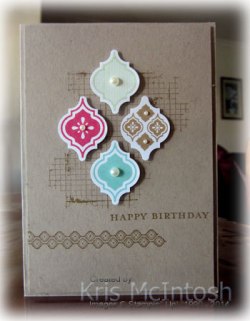 I stamped the Grid Background stamp onto Crumb Cake card using Baked Brown Sugar ink. The long image from the Mosaic Madness stamp set and the greeting from the Morning Meadow stamp set are both stamped using Baked Brown Sugar ink as well. I attached the stamped card to scored and folded Crumb Cake card using Stampin’ Dimensionals. I stamped the mosaic images from the Mosaic Madness stamp set onto Whisper White card using Pistachio Pudding, Coastal Cabana, Strawberry Slush and Backed Brown Sugar ink and punched them using the Mosaic Punch.
  The mosaic images are attached to the card front using Stampin’ Dimensionals. I also added Basic Pearls in various sizes to each of them.
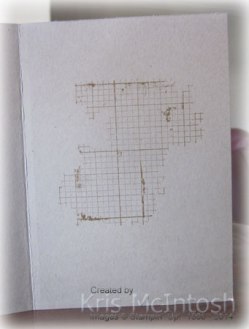
On the inside, I left the card fairly plain, just stamping the Grid Background in the centre using Baked Brown Sugar ink. Thanks to Kerry for the inspiration.
Now if you love this card as much as I do and you would like to re-create it, just pop on over to my online store to purchase all the supplies necessary.
Bye for now,
Kris
New Page – My Digital Studio
I wanted to create a page to give you a place to start to find information about My Digital Studio. The programme is fantastic and it comes with a fabulous range of downloads when you purchase it. However, it is sometimes hard to find some of that information for yourself. So I thought if I put it all together in one place, it is a great jumping off point for you. I have also included some of the most recent downloads, so that you can keep up to date. As I have frequently recommended, once you have purchased this programme, then joining the My Digital Studio webpage is a must. This site is free and offers all sorts of videos, competitions and shares by some amazing designers – two of whom are now from Australia (yay).
Here is another page I created in MDS. This one we created at my first My Digital Studio Class. The page again showcases adding one picture to several photo boxes at the same time.
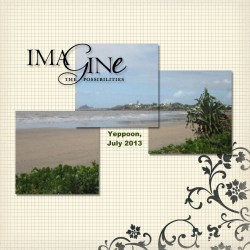 I added Love Letter Designer Series Paper (124012) No. 3 which came with my original purchase of MDS. Then I arranged three photo boxes to suit my photo, grouped them and added the one photo to fill the three boxes. The title is from the Word Play Stamp Brush Set (124432) which again came with my original purchase. I didn’t even change the colour. I added a text box for the location name and date. A simple page and quick to do but a great way to scrap your photos quickly and beautifully.
Again I hope that you find the addition of the My Digital Studio page helpful for those of you who have already purchased the programme and also for those thinking about it.
Bye for now,
Kris
MDS Monday Challenge 49
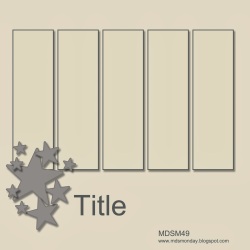
I really love how quickly a page can come together using My Digital Studio and by using the awesome sketch at MDS Monday.
Here is the sketch….
and here is my page.
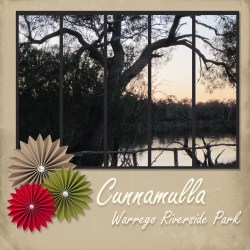 I took this photo last year when we visited Cunnamulla. Happy hour on the river bank, chatting, laughing, sharing stories and enjoying the beautiful view. Just gorgeous isn’t it.
My background paper is one from the Downtown Grunge Photobook Template (126056) which came with My Digital Studio when I purchase it. I added the photo boxes and grouped them so that my photo could spread over all of them. The rosettes are from the Designer Rosettes Digital Download (131525). The pearls from the Basic Pearls and Rhinestones (124330) were also part of my original purchase. I also added a square punch behind the photo boxes, which I re-sized and filled with a colour I picked from my photo.
I love the look of this with just a “pop” of colour from the rosettes. If you would like to re-create this page then all of the items, including My Digital Studio can be purchased through my online store.
Bye for now,
Kris
Happy Birthday Sarah
My eldest daughter Sarah is celebrating her birthday today. I was able to enjoy a lovely lunch with her, my other daughter Emma, grandchildren, my Mum and Dad as well as my sister Karyn and her granddaughter Tahlia at the Woorim Surf Life Saving Club. We were lucky that the day turned quite sunny and was lovely looking from the verandah out to sea.
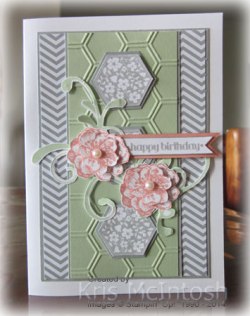 I cased the card I made for Sarah from one that Narelle Farrugia shared here. I attached a piece of Smoky Slate Designer Series paper from the Neutrals Designer Series Paper Stack to Smoky Slate card and then to scored and folded Whisper White card. I embossed Pistachio Pudding card using the Hexagon Embossing Folder, attached it to Smoky Slate card and then the card front. I stamped the floral image from the Six Sided Sampler three times onto Whisper White card. I cut the images by hand, attached them to Smoky Slate card which I punched using the Hexagon Punch and then to the card front.
 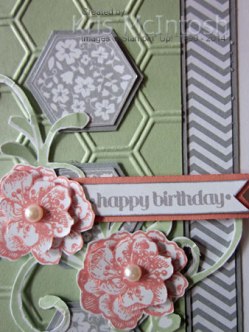 I stamped the swirly image from the Everything Eleanor stamp set onto Whisper White card using Pistachio Pudding ink, cut it out and attached it to the card front using Glue Dots. I stamped the flower from the Everything Eleanor stamp set onto Whisper White card four times. I cut out two whole flowers and two partial flowers, stacking them together with dimensionals before attaching them to the card front. I stamped happy birthday from the Itty Bitty Banners stamp set onto Whisper White card using Smoky Slate ink, cut it out and attached it to Calypso Coral card cut using one of the Itty Bitty Framelits dies.
 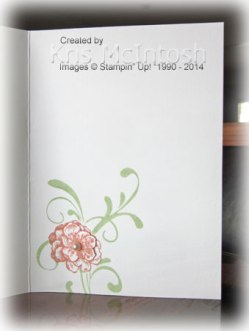 I added a Basic Pearl to centre of each of the flowers as my finishing touch. Inside the card I stamped the flower using Calypso Coral ink, masked it and then stamped the swirl image over the top using Pistachio Pudding ink. I stamped the flower again onto scrap Whisper White card and cut out a partial flower which I attached over the stamped flower and then added a Basic Pearl.
A big thank you to Narelle for the inspiration to create this card which both Sarah and I loved.
As always if you would like to recreate this card you can purchase all the items you need from my online store.
Bye for now,
Kris
MDS Monday Card
The latest challenge at MDS Monday is a card sketch.
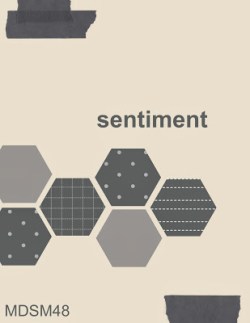
And here is my creation.
 I added Basic Black card stock as my background layer and then added a square punch which I resized and filled with Whisper White card stock. I added the hexagon punch shapes and filled each one with a different paper from the Season of Style Designer Series. My greeting comes from the Snowflake Soiree Stamp Brush Set Digital Download which I recoloured Cherry Cobbler. I added Season of Style Washi tape to the top and bottom edges of the card front.
I am really enjoying these digital challenges. I hope that my creation inspires you to try My Digital Studio.
Bye for now,
Kris
Technostamper Challenge 296
MaryJo has a great sketch challenge this week and it gave me another opportunity to use some of my new goodies. This time i have used the Language of Love stamp set from the Occasions Catalogue.
 I embossed Whisper White card using the Framed Tulips Embossing Folder and attached it to scored and folded Sahara Sand card. I embossed another piece of Whisper White using the Decorative Dots Embossing Folder, attached it to Sahara Sand card and then to the card front using dimensionals. I stamped the heart pennant from the Language of Love stamp set onto Whisper White card three times using Strawberry Slush ink and punched them out using the Petite Pennants Builder Punch. I stamped the flag image onto Whisper White card twice using Rich Razzleberry ink and cut them using the matching Banners Framelits Dies (Occasions Catalogue).
  I attached the pennants and flags to the card front using Glue Dots and them added Large Basic Rhinestones between each of them. I stamped happy anniversary from the Express Yourself stamp set onto a narrow strip of Whisper White card using Strawberry Slush ink and cut a “v” in one short end. I added Strawberry Slush 3/8″ Ruffle Stretch Trim to the lower edge and then attached it to the card front using dimensionals.
  I stamped the large heart from the Language of Love stamp set onto the lower left hand corner of Whisper White card using Rich Razzleberry ink and attached it to the inside of the card.
This is another great set from the Occasions Catalogue I am going to have fun using. I’d love to hear what you think.
I just realised this also fits the challenge at Late Night Stampers too!
Bye for now,
Kris
Something New
It is so exciting when a new catalogue is about to be released! Stampin’ Up! lets demonstrators pre-order from a new catalogue about 3 weeks early. This year we also got to earn Sale-A-Bration items early too! Sooo, my pre-order arrived this week and I have started to play with my new goodies.
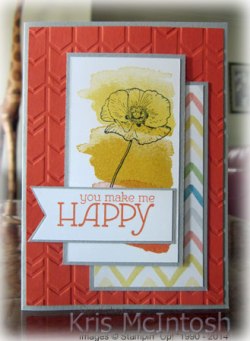 One of the stamp sets that really caught my eye was Happy Watercolour. This is an 8 piece stamp set and includes two lovely flowers but it also includes some cool stamps so that you can create a watercolour effect on your projects. So this is my first share using this stamp set.
This card was created using the sketch challenge at Try Stampin’ on Tuesday. I embossed Tangerine Tango card using the fabulous Arrow Embossing Folder (new Occasions Catalogue) and attached it to scored and folded Sahara Sand card. I attached a piece of Watercolour Wonder Designer Series Paper (new Occasions Catalogue) to Sahara Sand card and then to the card front. I stamped the large “splotch” image from the Happy Watercolour stamp set (occasions Catalogue) onto Whisper White card using Tangerine Tango, Crushed Curry and Daffodil Delight. 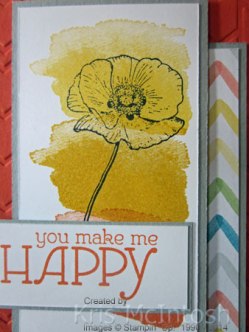 I stamped the flower image over the top using Stazon Jet Black ink. The image panel is attached to Sahara Sand card and then to the card front. I stamped the greeting from the Happy Watercolour stamp set onto Whisper White card using Tangerine Tango ink and cut a “v” shape in one end. I attached the Whisper White card to Sahara Sand card and then to the card front using a dimensional under the “v” shaped end and Snail on the other end so that I could lay it on top of the image panel. To decorate the inside of the card I stamped the splotch image using Tangerine Tango and Crushed Curry onto the lower left hand corner of Whisper White card. The flower image is stamped over the top using Stazon Jet Black ink and then attached to the inside of the card.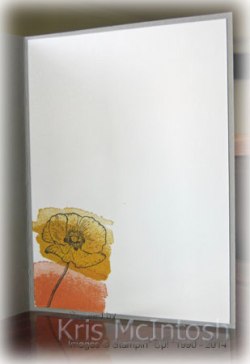
Well, what do you think? I’m sure you will love this set as much as me. If you don’t have a Stampin’ Up! Demonstrator then please contact me so that I can arrange for you to receive both the Occasions and the Sale-A-Bration catalogues.
I am going to have a lot of fun playing with this stamp set and hope to be back with more samples soon.
Bye for now,
Kris
Pocket Cards
 I saw a post at My Digital Studio where Janet Wakeland had created cards using one of the Pocket Card Digital Downloads and it got me thinking about creating a hybrid card of my own.
I found my This Makes Me Happy Pocket Card digital download, printed out two of the A4 pages and cut them up. I took the Love, Love, Love pocket and trimmed it down so that I could use it as the focal image on my card.
I embossed Whisper White card using the Framed Tulips Embossing Folder but only the left hand side. I attached the embossed card to scored and folded Pool Party card. I embossed Pool Party card using the Stripes Embossing Folder and attached it to the right hand side of the Whisper White card. I embossed Summer Starfruit card using the Perfect Polka Dots Embossing Folder, tied Whisper White 5/8″ Organza Ribbon in a knot around the embossed card and attached it to the card front using dimensionals under the left hand side only. I added a mat of Calypso Coral to the pocket card and attached it over both the Summer Starfruit and Pool Party card using dimensionals under the right hand side.
 To decorate the inside, I cut down another Pocket Card and added a strip of Calypso Coral Card to the top edge. This piece is attached to Whisper White card and then to the inside of the Pool Party card.
I think it turned out really well. I will be checking out some of my other digital downloads to see which ones can be turned into the focal image on more cards.
Bye for now,
Kris
Challenge – Try Stampin’ on Tuesday
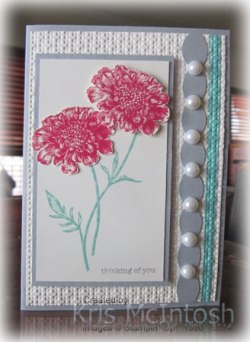 I had some time this week to try a new challenge card. I found the sketch at Try Stampin’ on Tuesday and decided to give it a try. The added twist was to add some sparkle which I decided not to do.
My card beings by attaching a narrow strip of Coastal Cabana card to Very Vanilla card and then embossing with the Square Lattice Embossing Folder. I cut a strip of Smoky Slate card using the Tasteful Trim Die, attached it to the embossed Very Vanilla card and then to scored and folded Smoky Slate card. 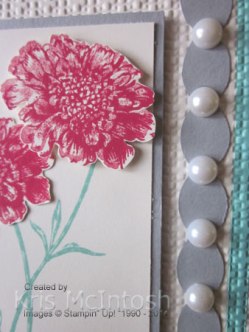 I stamped the stem image from the Field Flowers stamp set onto Very Vanilla card using Coastal Cabana ink, attached it to Smoky Slate card and then to the card front using dimensionals. I stamped the large solid flower from the same stamp set onto Very Vanilla card using Real Red ink which I had stamped off onto scrap paper first. I stamped the outline flower stamp over the top using Real Red ink and then cut them out.
  The flowers are attached over the ends of the stems, one flat onto the Very Vanilla card and one using dimensionals. Finally I added Large Pearls to the Smoky Slate card.
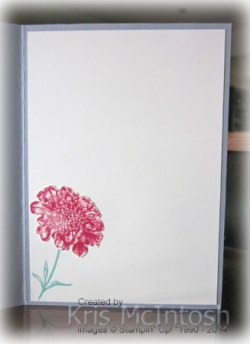
To decorate the inside of the card I inked the stem and stamped part of it onto Very Vanilla card. I stamped and cut out another large flower and attached it to the end of the stem.
I’d love to hear what you think.
Bye for now, Kris.
MDS Challenge
I found a blog called MDS Mondays which sets challenges to create digitally. It doesn’t have to be My Digital Studio but of course that is what I used. The current challenge is to use this sketch.

And here is my creation.

This page celebrates the graduation of my grandaughter Jae from her Pre-Prep class. Doesn’t she look cute? The page is created using designer series paper and embellishments from the Travel Log Kit which comes as part of your downloads when you purchase My Digital Studio.
Hopefully I will be able to participate in more the challenges from this site and get some more of my photo stash scrapped.
You can try My Digital Studio free for 30 days by visiting my online store, creating an account and purchasing the free download. I’m sure you will love it as much as I do.
Bye for now,
Kris
 UPDATE: This page was selected as a Top Pick for this challenge. I am so excited. Thanks so much to the Design Team firstly for selecting my page and secondly for providing such inspiring challenges. Kris